Built for WKF, WUKF, and AAU Events
Every Feature, Built for Karate Tournaments
Thirty-plus features that handle every piece of running a tournament, from registration to certificates. Here's what's inside.
Thirty-plus features that handle every piece of running a tournament, from registration to certificates. Here's what's inside.
The Division Tree Builder lets you define division logic visually. Split by gender first, then age, then weight, then rank. Build it as deep or as flat as your event requires. As you build, the system flags overlapping criteria in real time so you never end up with a competitor eligible for two divisions at once.
The Auto-Assignment Engine places every approved competitor in the correct division the moment they're approved. Age, weight, gender, rank, experience, all evaluated together. Edit one competitor and only their events get re-evaluated. A 1,000-person tournament doesn't re-process every division because one person changed weight class.
Multi-template support means a single event can run multiple division structures side by side. One template for senior kata, a different one for junior kata, all under the same event.
Each format has its own scoreboard and match logic, all in one system. The Bracket Generator reads your event name and auto-selects the right scoreboard type, bracket type, and seeding method. You confirm rather than configure from scratch.
Before you generate, the Readiness Checklist shows each division with its approved competitor count, flags any with fewer than two competitors, and reports how many divisions are ready out of the total. No more guessing at midnight.
The Already-Bracketed Guard prevents you from accidentally regenerating a division that's already in progress. The system knows which divisions have brackets and deselects them by default. You can still regenerate if you mean to, but you have to opt in.
Bracket Locking kicks in once scoring starts. A locked bracket rejects further competitor changes, which keeps your live data from getting corrupted while a match is in progress.
Competitor additions, bracket updates, and scoring changes all propagate instantly. The director's screen and the check-in tablet stay in sync without anyone hitting refresh. WebSocket-based, no polling, no lag.
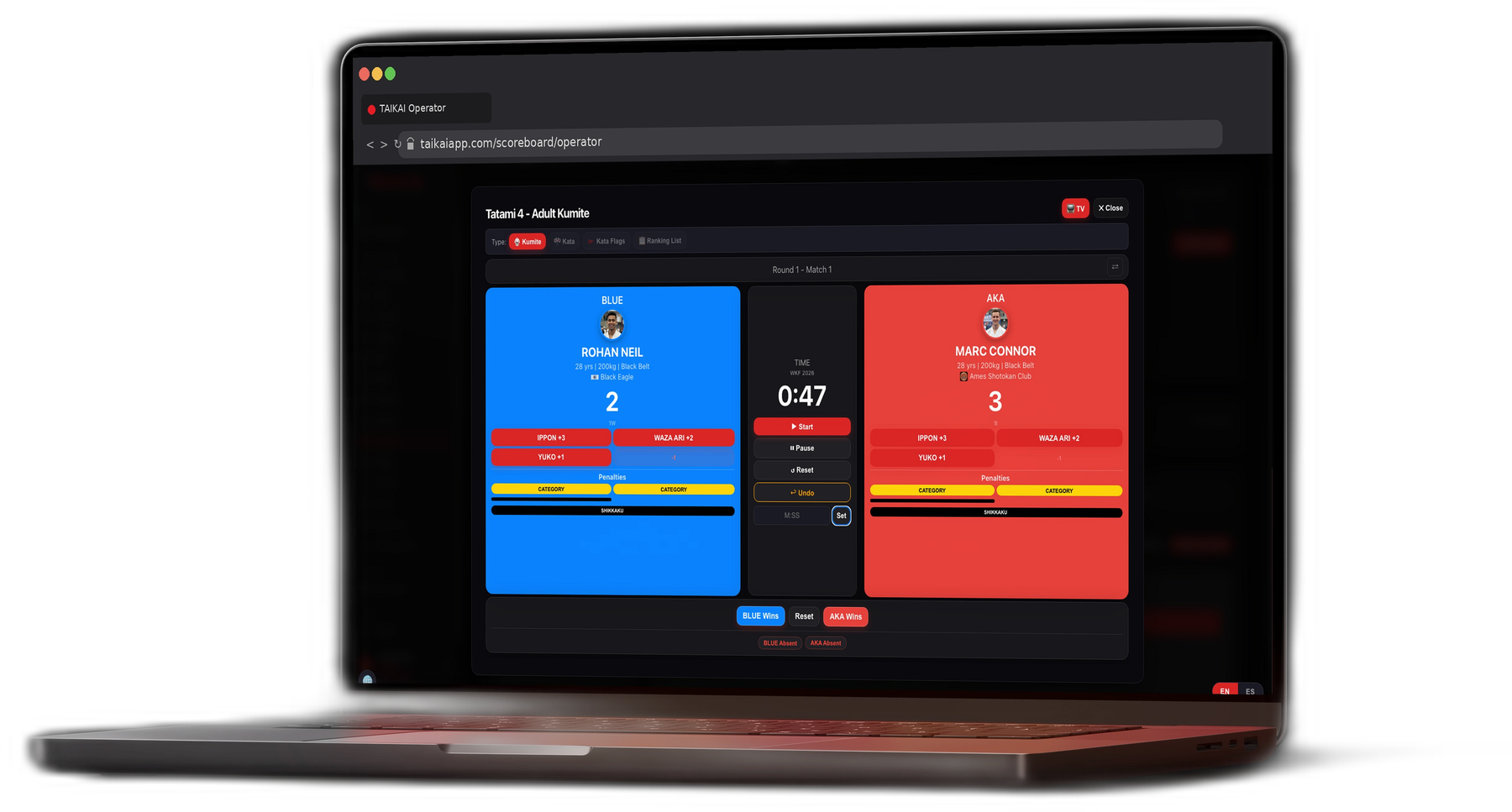
Judges score directly on the scoreboard screen. Points update in real time across every connected screen, table display, and projector view. Kata events support full panel scoring, with judges submitting independent scores and the system automatically dropping the high and low per WKF rules.
WKF kumite, AAU kumite, kata flags, kata points, team kumite, and kobudo each have their own dedicated scoring interface. Every match log is timestamped so disputes can be reviewed and resolved.
Competitors register online, pay or pay later, and arrive at check-in with a QR code. Staff scan the QR, see the full profile, confirm weight on the spot, and move competitors to a different division if they weigh in out of range. No clipboards. No scribbled notes nobody can read.
Walk-ins get handled too. When a director adds a competitor with an email address, the system creates a passwordless account and sends an invite. The competitor gets their profile without the director ever collecting a password.
CSV import handles bulk registrations from existing rosters. Pre-filled template, row-by-row preview, per-row error reporting before anything commits.
The Pay-Later option lets directors accept registrations without requiring upfront payment. Credits still deduct at registration so the director keeps full visibility. Whether the competitor pays you in cash on the day is between you and them. The platform stays out of it.
Multi-staff permissions. Define roles like Registration Desk, Check-In, or Scoreboard Operator with granular permissions. Staff can't exceed their assigned scope. Your registration volunteer can't accidentally lock a bracket. Your scoring table can't accidentally edit competitor records.
Tournament Cloning duplicates an entire event with one click. All events, pricing periods, division templates, and staff roles come with it. Next year's tournament setup is done before you finish your morning coffee.
Batch operations let directors approve, unapprove, or delete multiple competitors at once. Auto-assign runs once at the end, not separately for each change.
Delete Guard prevents accidents by forcing you through unapprove and credit refund before any approved competitor can be deleted. Single-competitor division transfer lets you merge a lone competitor into an adjacent division with one click. No more handing out a walkover trophy to a kid who never got to compete.
Schedule generation builds your day from your bracket structure, estimating match durations by division and interleaving across multiple tatami areas. Auto-advancement moves winners forward automatically. Double-elimination tracks both winners and losers brackets simultaneously.
Certificate printing. Podium placements generate ready-to-print certificates directly from bracket results. No manual data entry into a Word template at the awards table.
Offline mode. The whole app installs as a Progressive Web App. If your venue's wifi drops, failed API calls queue in the background and replay automatically when connectivity returns. Tournament day doesn't stop because someone unplugged the router.
Multi-language. Every interface string runs through a translation system. Adding a new language is a JSON file, not a code rewrite. International events work in the language your judges and competitors actually speak.
Dojo and academy tools. Dojos manage their own members, submit team registrations, and track who's registered across multiple tournaments. Separate from the director's view, so an academy with twenty competitors at three different events sees all of it in one place.
No credit card required. The first 50 directors to buy credits during beta become founding directors — 20% off standard pricing forever.